How to design your own chair
The sizes to use, the steps from sketch to cut parts, and the checks to make before anyone sits on it.
A chair is a shape drawn around a few numbers. Get the numbers right for the person and the table, draw the side profile around them, try a small model, then cut it full size. You can do all of it on paper.
1. Decide what it is for
The use sets the sizes. A dining or desk chair holds you fairly upright at a table. An easy chair (a lounge chair) is lower, tilts you back and needs no table. A stool has no back at all. A child's chair is smaller in every direction. Pick one before you draw anything, because a chair that tries to be all of these fits none of them.
2. The sizes that matter
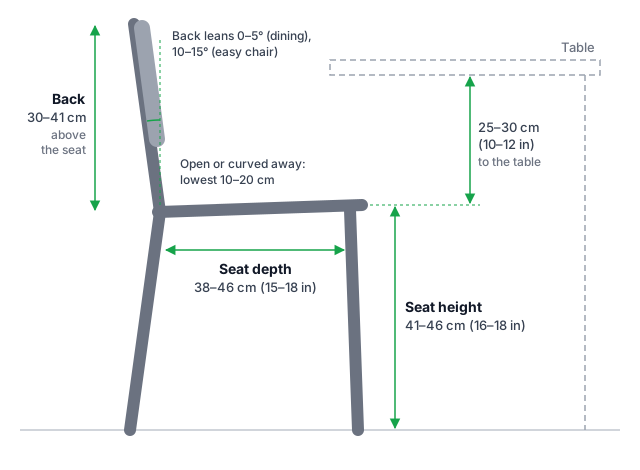
| Dining or desk chair | Easy chair | |
|---|---|---|
| Seat height | 41–46 cm (16–18 in) | About 41 cm (16 in), allowing for a cushion |
| Seat depth | 38–46 cm (15–18 in) | 38–46 cm (15–18 in) |
| Seat width | 41–51 cm (16–20 in), often 5–8 cm (2–3 in) narrower at the back than the front | |
| Seat slope | Back edge up to 2.5 cm (1 in) lower than the front | Tilted back about 10° |
| Back | Leans back 0–5° | 95–120° between seat and back |
| Back height above the seat | 30–41 cm (12–16 in) | No more than 36–41 cm (14–16 in) |
| Arms above the seat | 18–23 cm (7–9 in) | 13–20 cm (5–8 in) |
| Seat to the underside of the table | 25–30 cm (10–12 in) | No table |
These are for an average adult, from Woodbin's chair design guidelines and the table clearance from IKEA's dining chair size guide. Leave the lowest 10–20 cm (4–8 in) of the back open or curved away, so there is room for the hips and the back rests on the lower spine, not the seat edge.
Fit it to one person
If the chair is for someone in particular, measure them sitting down, with the shoes they will wear. The seat should be no higher than the distance from the floor to the back of their knee, or the front edge will press into their thighs. The seat should stop a few fingers' width short of the back of the knee: a seat that is too deep pushes the sitter forward into a slouch.
3. Draw the side profile
Most of a chair's character is in its side view, so start there. On squared paper at 1:5 (one 1 cm square for every 5 cm), or full size on a sheet of cardboard:
- Draw the floor, and the underside of the table if it has one.
- Mark the front edge of the seat at the seat height.
- Draw the seat back from there for the seat depth, dropping slightly towards the back.
- Draw the line of the back at its lean, up to the back height.
- Add the legs. Put the front feet under the front edge of the seat and the rear feet back under the top of the backrest (step 6 explains why).
- Thicken the lines into the parts you will cut, then sketch a person sitting in it to check it looks right.
Once the profile works, draw the front view to set the width and decide whether the legs splay out.
4. Choose how it goes together
A chair you cut from flat sheets is the easiest kind to make from a drawing. The usual method is slot-together plywood: a few side profiles running front to back, joined by slats or cross pieces, each with a slot cut halfway through so the two lock together. No screws are needed for a model, and a full-size chair can be glued once you are happy with it.
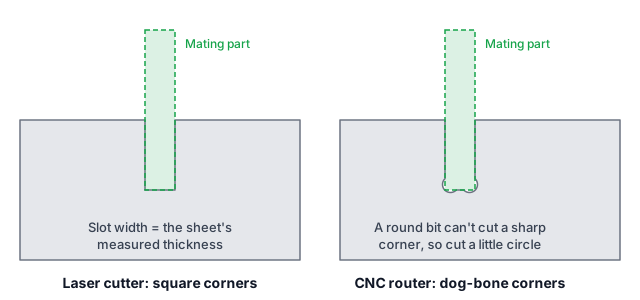
- Make each slot as wide as the sheet is thick, measured, not as sold. Plywood sold as 18 mm is often a fraction of a millimetre off, and the difference is what makes a joint loose or impossible to push home.
- On a CNC router, add dog-bones. A round bit cannot cut a sharp inside corner, so it leaves a curve that stops the mating part going all the way in. A small circle cut at each inside corner, the size of the bit, fixes it. A laser cuts square corners and does not need them.
- Machine and material go together. Most hobby laser cutters only cut thin sheets, so they suit scale models. A full-size chair usually means a CNC router and plywood 12–18 mm thick, nested onto standard 2440 × 1220 mm (8 × 4 ft) sheets.
- Keep slots away from the weak spots. Where the seat turns up into the back, a profile bends the most under load. Don't put a slot or a narrow neck there.
5. Make a small model first
A model at 1:10 or so shows in an evening what a drawing hides: proportions, wobble and parts that don't meet. Scale the sheet thickness by the same amount as everything else. A chair to be cut from 18 mm plywood becomes a 1:10 model in 1.8 mm card or plywood; if you have 1.5 mm card and plan to use 12 mm plywood, model at 1:8. Cut it with a craft knife or on a laser cutter, slot it together and press on the seat and the top of the back with a finger to see what moves.
6. Check it won't tip
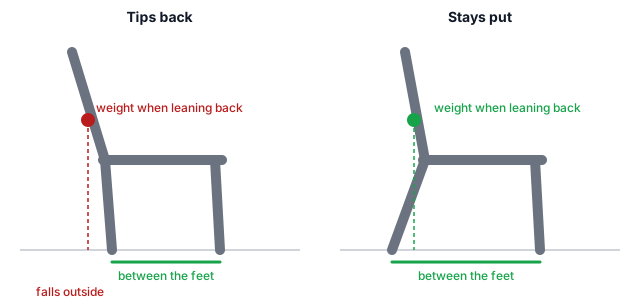
A chair stands as long as the weight of the person in it falls between its feet. People lean back, so the weight moves towards the backrest; if the back leans out past the rear feet, the chair goes over. Set the rear feet back under the top of the backrest, or behind it. People also stand up by pushing down on the front edge, so keep the front feet close to it, and set the feet at least as wide apart as the seat.
7. Cut it full size and test it
- Measure the sheet you will actually use, in several places.
- Cut a test piece with three slot widths (the measured thickness, and 0.2 mm and 0.4 mm wider) and keep the one that pushes together firmly by hand.
- Cut the parts, sand the edges and put it together without glue.
- Sit down slowly with a hand on a table, then rock gently forwards, backwards and sideways. Listen for creaks and watch the joints.
- Glue it only once nothing moves.
A chair carries a person's whole weight, and more when they drop into it. Plywood varies from sheet to sheet, so test every chair you make before you trust it, and stop using it if a joint opens or a part cracks.
Doing it on a computer
Paper is enough for all of this. If you would rather draw on screen, SketchChair is one free way to do steps 3 to 6: you draw the side profile, it builds the slot-together parts, lets you test the chair, and exports the flat parts as SVG or DXF for a laser cutter or CNC router, with a setting for the thickness of your sheet. It runs in your browser (in beta) or on Mac and Windows.